Linux下配置VNC
系统大全为您提供
1. 检查是否安装了VNC:
rpm -qa vnc-server
vnc-server-4.1.2-9.el5
没安装的话,安装一下:
yum install vnc-server
2. 配置vncserver登录密码:
[root@Redhat ~]# vncserver
You will require a password to access your desktops.
Password:
Verify:
xauth: creating new authority file /root/.Xauthority
New 'Redhat:1 (root)' desktop is Redhat:1
Creating default startup script /root/.vnctartup
Starting applications specified in /root/.vnctartup
Log file is /root/.vnc/Redhat:1.log
3. 配置vncserver启动文件:
vi ~/.vnctartup
修改后文件:
#!/bin
# Uncomment the following two lines for normal desktop:
unset SESSION_MANAGER
exec /etc/X11ititrc
[ -x /etcnctartup ] && exec /etcnctartup
[ -r $HOME/.Xresources ] && xrdb $HOME/.Xresources
xsetroot -solid grey
vncconfig -iconic &
xterm -geometry 80x24+10+10 -ls -title "$VNCDESKTOP Desktop" &
# twm &
gnome-session &
4. 配置vncservers文件
vi /etc/sysconfigncservers
修改后文件:
# The VNCSERVERS variable is a list of display:user pairs.
#
# Uncomment the lines below to start a VNC server on display :2
# as my 'myusername' (adjust this to your own). You will also
# need to set a VNC password; run 'man vncpasswd' to see how
# to do that.
#
# DO NOT RUN THIS SERVICE if your local area network is
# untrusted! For a secure way of using VNC, see
# <URL:http://www.uk.research.att.com/archive/vnc/sshvnc.html>.
# Use "-nolisten tcp" to prevent X connections to your VNC server via TCP.
# Use "-nohttpd" to prevent web-based VNC clients connecting.
# Use "-localhost" to prevent remote VNC clients connecting except when
# doing so through a secure tunnel. See the "-via" option in the
# `man vncviewer' manual page.
# VNCSERVERS="2:myusername"
# VNCSERVERARGS[2]="-geometry 800x600 -nolisten tcp -nohttpd -localhost"
VNCSERVERS="1:root"
VNCSERVERARGS[1]="-geometry 1024x768 -nolisten tcp -nohttpd -localhost"
5. 关闭防火墙
service iptables stop
或者开放VNC端口:
/sbin/iptables -I INPUT -p tcp --dport 5801 -j ACCEPT
/sbin/iptables -I INPUT -p tcp --dport 5900:5903 -j ACCEPT
/etc/rc.d/init.d/iptables save
/etc/init.d/iptables restart
6. 杀掉当前进程:
vncserver -kill :1
vncserver -kill :2
...
7. 启动vncserver
[root@Redhat ~]# vncserver
New 'Redhat:1 (root)' desktop is Redhat:1
Starting applications specified in /root/.vnctartup
Log file is /root/.vnc/Redhat:1.log
8. 通过浏览器(JAVA)连接:
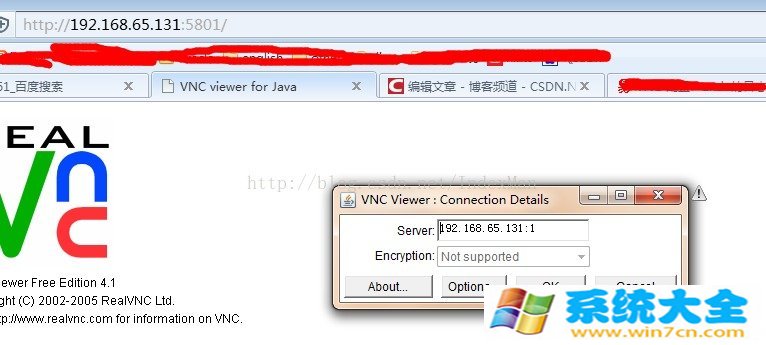

根据提示输入前面配置的登录密码即可打开!
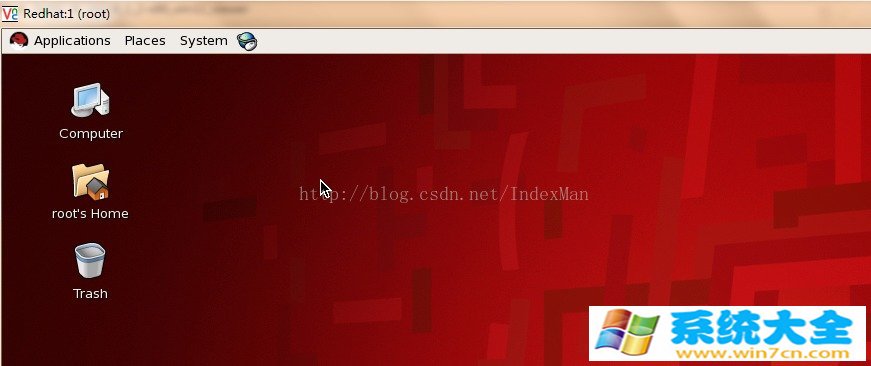
a、黑屏
在Linux里安装配置完VNC服务端,发现多用户登陆会出现黑屏的情况,具体的现象为:
客户端可以通过IP与会话号登陆进入系统,但登陆进去是漆黑一片,除了一个叉形的鼠标以外,伸手不见五指。
原因:用户的VNC的启动文件权限未设置正确。
解决方法:将黑屏用户的xstartup(一般为:/home/用户名称/.vnctartup)文件的属性修改为755(rwxr-xr-x)。
b、vnc 能输入数字,但不能输入字母
原因:vnc server这边会要求vnc viewer这边OS的输入法要和vnc server那边OS的语言要一致。
解决方法:一般我们装的Linux OS都是E文的,所以使用vnc viewer连入的时候,请关闭本地OS的中文输入法,切换到英语就可以了。
--------------------------------
以上就是系统大全给大家介绍的如何使的方法都有一定的了解了吧,好了,如果大家还想了解更多的资讯,那就赶紧点击系统大全官网吧。
本文来自系统大全http://www.win7cn.com/如需转载请注明!推荐:win7纯净版
相关文章
- 系统之家装机大师 U 盘重装 Win10 系统详细教程
- 系统之家装机大师 U 盘重装 Win11 系统详细教程
- 系统之家装机大师 U 盘重装 Win7 系统详细教程
- 微软 Win11 24H2 / 25H2 发布 8 月累积更新补丁 KB5121003
- 微软发布 Win10 八月扩展安全更新 KB5120249!附下载地址
- iOS 27 Beta 5 细节优化:液态玻璃透明度上限提升,界面通透感更强
- 微软 8 月安全补丁修复 400 个漏洞、3 项零‑day 漏洞!
- 谷歌全方位整治 Chrome 垃圾推送通知,优化授权弹窗体验
- 微软 2026 财年数据:Win10/Win11 客户端收入仅占总营收 5%
- 微软大幅上调 Windows OEM 授权费 7%-10%!
系统下载排行榜71011xp
【番茄花园】Win7 64位 快速稳定版
2【纯净之家】Windows7 32位 全新纯净版
3【雨林木风】Windows7 64位 装机旗舰版
4【纯净之家】Win7 64位 Office2007 办公旗舰版
5JUJUMAO Win7 64位旗舰纯净版
6【电脑公司】Windows7 64位 免费旗舰版
7【游戏专用】Windows7 64位 装机旗舰版
8【深度技术】Windows7 64位 官方旗舰版
9【番茄花园】Windows7 64位 旗舰装机版
10【纯净之家】Windows7 SP1 32位 全补丁旗舰版
【纯净之家】Windows10 22H2 64位 企业版
2【纯净之家】Windows10 32位 官方正式版
3【技术员】Windows10 64位 纯净版iso镜像
4【雨林木风】Windows10 64位稳定版系统
5JUJUMAO Win10 64位 纯净版镜像
6【技术员】Windows10 64位 系统纯净版
7【技术员】Windows10 64位 纯净装机版
8【番茄花园】Windows10 64位 专业版镜像
9【雨林木风】Windows10 64位 中文精简版
10【雨林木风】Windows10 64位 官方专业版
【纯净之家】Windows11 23H2 64位 纯净专业版
2【纯净之家】Windows11 23H2 64位 游戏优化版
3【纯净之家】Windows11 23H2 64位 企业版系统
4【纯净之家】Windows11 23H2 64位 中文家庭版
5风林火山Windows11下载中文版(24H2)
6JUJUMAO Win11 24H2 64位 精简版镜像
7JUJUMAO Win11 24H2 64位 专业版镜像
8【纯净之家】Windows11 23H2 64位 纯净家庭版
9电脑公司Win11 64位高级专业版系统 V2022
10电脑公司Win11 64位专业优化版 V2021.08
深度技术 GHOST XP SP3 电脑专用版 V2017.03
2深度技术 GGHOST XP SP3 电脑专用版 V2017.02
3萝卜家园 GHOST XP SP3 万能装机版 V2017.03
4番茄花园 GHOST XP SP3 极速体验版 V2017.03
5雨林木风 GHOST XP SP3 官方旗舰版 V2017.03
6萝卜家园 GHOST XP SP3 完美装机版 V2016.10
7Win7系统下载 PCOS技术Ghost WinXP SP3 2017 夏季装机版
8电脑公司 GHOST XP SP3 经典旗舰版 V2017.03
9雨林木风GHOST XP SP3完美纯净版【V201710】已激活
10雨林木风 GHOST XP SP3 精英装机版 V2017.04
热门教程
装机必备 更多+


重装工具